01
One board, every market
Post a date with venue, program, instrumentation, rate, and an optional deadline. The whole roster sees it at once, so nobody gets an email asking if they are free.
Open datesAll markets
DateMarketProgramOpen slots
Concert dates go on a board. Musicians bid on the ones they can play. You decide. Accepted players get their music, script, logistics, and an invoice that fills itself in.
How it works
Four steps that replace a week of availability emails. Each card below is a real screen in the app.
Post a date with venue, program, instrumentation, rate, and an optional deadline. The whole roster sees it at once, so nobody gets an email asking if they are free.
Every bid lands in one view with the musician's instruments. Compare them, then accept or deny. A slot stays open until you close it, never on the first bid.
Bids appear here as musicians submit them. You choose when to decide.
Accept a bid and the musician gets a page with the sheet music, script, and logistics for that exact date. Update a program's links once; every date using it follows.
Payment and tax details are entered once. Each accepted date drafts an invoice with the date, venue, and rate already in place. You track submitted, approved, and paid.
On every phone
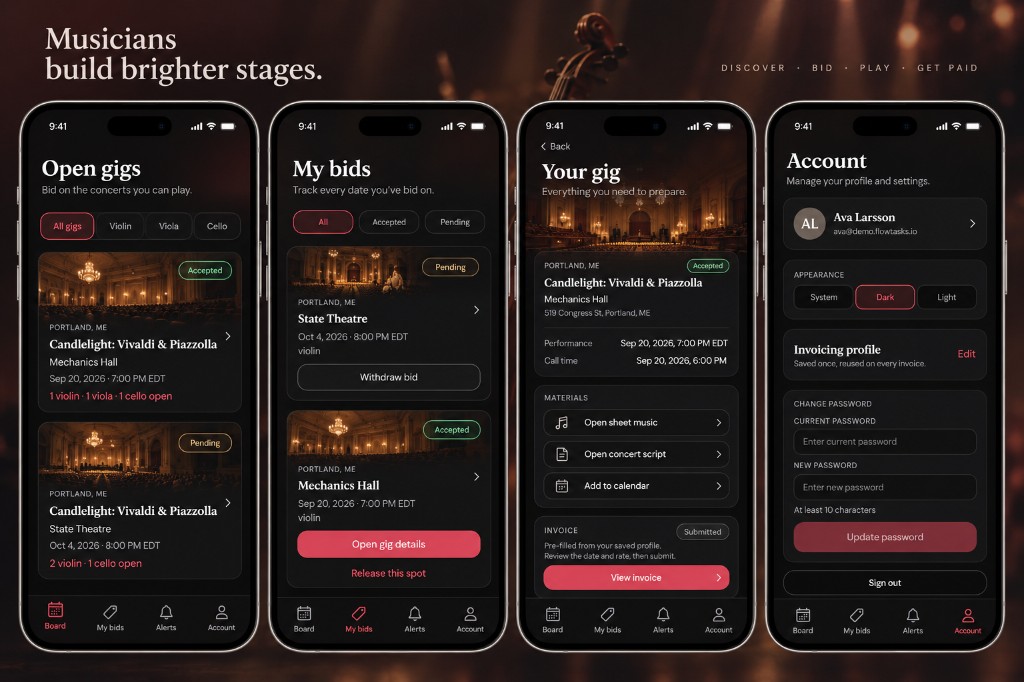
The musician view is a native app. Filter open gigs by instrument, bid in a tap, and once you are booked get the sheet music, the concert script, a calendar invite, and an invoice that is already filled in.
Ready when you are